How to Set a Vintage Seiko Day-Date Watch
A vintage Seiko day-date watch often needs only a minute to set—unless you follow instructions for the wrong movement. On some Seiko 5 watches the day advances when you press the crown; on others, day and date are adjusted by turning a crown in its first pulled position. Applying the wrong technique, or changing the calendar while the mechanism is already engaged overnight, can damage an otherwise healthy vintage watch.
This guide covers the safe approach before you touch the crown, explains the widely used quickset procedure and its exceptions, and shows how to deal with bilingual calendars, AM/PM and shorter months. The correct movement-specific manual always takes precedence over generic advice. You can usually identify the four-digit caliber to the left of the hyphen on a Seiko caseback, but the caseback and movement must agree before you rely on that identification.
Before you start: identify the caliber and the crown
Do not begin by twisting the crown to see what happens. First, read the caliber–case code on the back; for example, a reference with 7009 before the hyphen identifies the caliber family. The number after the hyphen identifies the case configuration, not the caliber itself. Casebacks can occasionally have been swapped, which is why a credible watch history and, where necessary, movement inspection matter.
Check whether the crown is a conventional push-pull type or screws down. A screw-down crown must be unscrewed before pulling it and properly resecured afterwards. Never force a resistant crown, never manipulate it under water, and do not assume that every click, turn or push performs the same function across decades of Seiko production.
The Seiko 7009 movement guide and the 6119 guide are useful for caliber identification before attempting a setting procedure. A photograph of a different Seiko 5 may show a similar dial while concealing a different mechanism.
The essential safety rule: move the hands away from the changeover window
Seiko's general instructions for analogue day-date watches warn against manually changing the calendar between 9:00 p.m. and 4:00 a.m. During those hours a day/date driving mechanism may already be engaged. For an unfamiliar vintage watch, a conservative approach is to position the hands around 6:00 first, well outside the window, before using any quickset function. Do not assume the time currently shown is a verified morning or evening time; what matters is the hand position relative to engagement.
If the hands show, for example, 11:30, pull the crown to its actual time-setting position and move the hands forward carefully until they indicate approximately 6:00 away from the changeover interval. Do not force the hands if resistance is abnormal. Once the safe position is established, use only the calendar-setting method appropriate for that caliber.
The 9 p.m.–4 a.m. window is the conservative interval stated in Seiko's broad day-date instructions. Other particular calibers can differ, and a watch that is damaged, altered or poorly assembled can behave unpredictably. Those are reasons to consult its own instructions, not to experiment with the crown.
Standard two-click crown: set yesterday's day and date first
On many Seiko day-date movements, the crown has a normal resting position, a first pulled position for quicksetting the calendar, and a further position for setting the hands. The direction that operates the day versus the date may vary; verify it for your exact caliber. A typical manufacturer-sanctioned method is to set the previous day and date first, then roll the hands forward through midnight to synchronize the calendar with the correct AM/PM period.
- Identify the exact movement, then move the hands to a safe time such as 6:00 before touching the quickset.
- Pull the crown to the calendar's first click, if that is the correct arrangement for your caliber. Turn it gently in the specified direction to set yesterday's date.
- If the caliber's instructions permit, turn the crown in the other direction to select yesterday's weekday, including the correct language on a bilingual wheel.
- Pull the crown to the time-setting position. Advance the hands forward until the date rolls to today's date. You have just crossed midnight; the hands are now on the morning side of the 24-hour cycle.
- Continue advancing the hands to the correct current time. If it is afternoon, go past noon first. Return the crown to its proper resting position and secure it if screw-down.
The point of setting yesterday first is not ritual: it lets the watch make the final calendar change through its own ordinary midnight drive while you set the actual time. Trying to set today's date with the quickset and then advancing across midnight can leave tomorrow's date showing. Do not keep forcing the calendar if its behavior is inconsistent.
The important 7009 and 7019 exception: press the crown to change the day
Seiko's published general analogue-watch instructions explicitly identify calibers 7009 and 7019 as exceptions: after selecting the previous date at the first click, return the crown to its normal position and press the crown repeatedly to advance the weekday. This is why the instruction “turn the crown the other way to select the day” is not a universal rule for vintage Seiko watches.
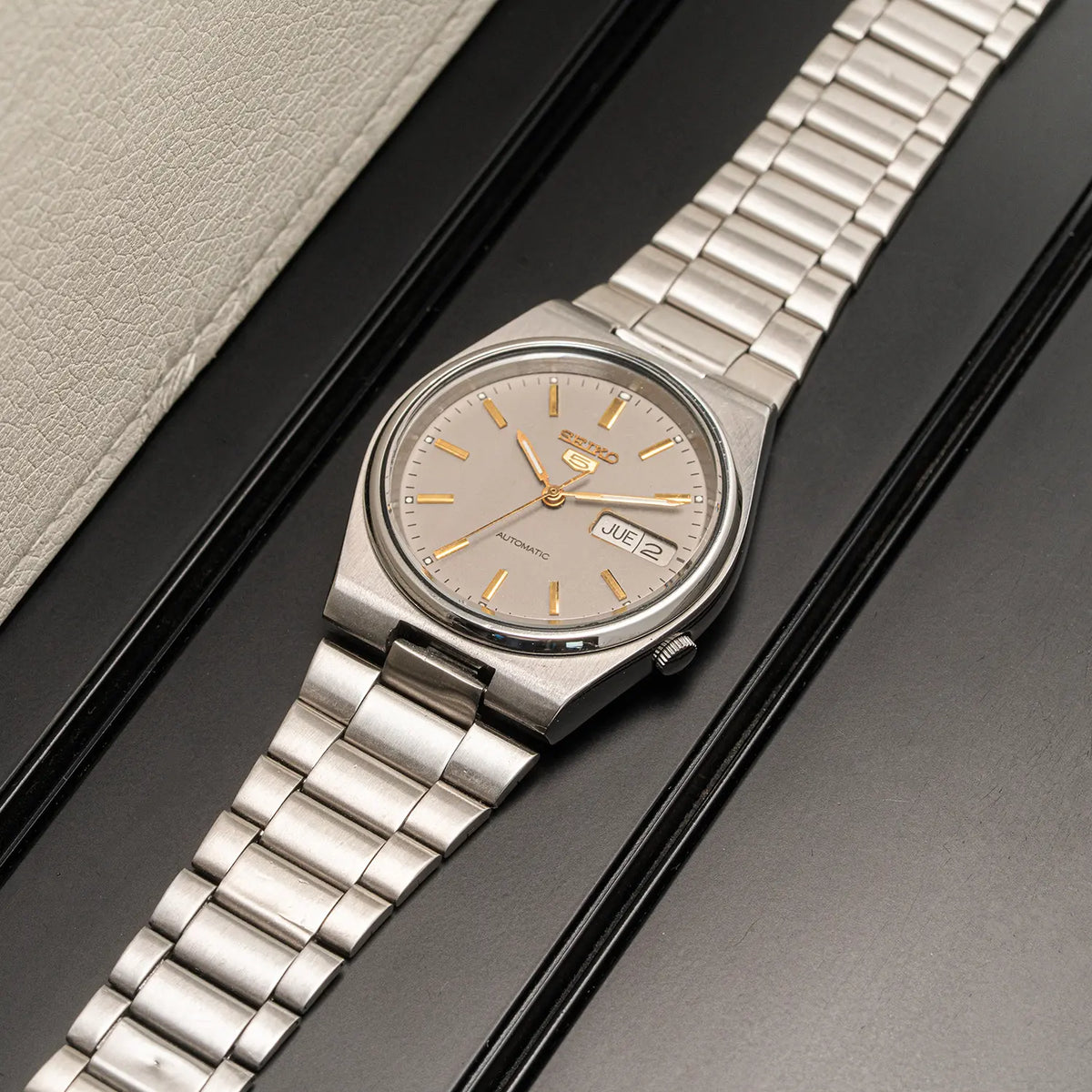
A documented VWS example is the Seiko 5 7009-3130, catalogued as a 1984 automatic model with a day-date display. The photographs help identify the actual model family; they are not evidence that the crown can safely be operated if it is damaged or stiff.

For a healthy 7009, start from a safe 6:00 hand position and quickset the date using the first click according to its manual. Then push the crown in and use gentle, individual presses to advance the day until the prior weekday and chosen language are displayed. Only after that should you pull out the crown fully and advance the hands through midnight to the present date and correct time. Never apply heavy pressure or repeat presses against noticeable resistance.
What about Seiko 6119, 6319 and 7S26?
These calibers are not a single calendar-setting mechanism. The 1976 Seiko 5 6119-5431, archived in the VWS catalog, has a day-date layout, but the fact that it is an automatic Seiko 5 is not sufficient to prescribe the same crown operation as the 7009. Certain vintage movements have push-type calendar setting arrangements, and some differ according to the exact design or variant. Consult the matching 6119 instructions rather than transferring the 7009 procedure by appearance.

Likewise, a Seiko 5 6319-8100, catalogued as a 1977 automatic, has its own caliber identity; the presence of day and date on the dial does not establish the quickset mechanism. Use the correct technical source, and if the crown action is uncertain, have a watchmaker demonstrate it rather than experimenting.

A later Seiko 5 7S26-3170 from the VWS archive illustrates another generation of mechanical day-date watches. Seiko includes 7S26 in its general analogue and mechanical instructions, with standard first-click calendar setting. Unlike a hacking movement, many traditional Seiko automatic calibers cannot be expected to stop the seconds hand at the time-setting position. Do not apply pressure or reverse the hands violently in an attempt to make the watch hack.

Bilingual day wheels: English, Kanji and transitional displays
Many Seiko day wheels carry two language systems. On a watch with English and Japanese characters, both may pass across the aperture during an ordinary automatic day change. Seiko's instructions specifically note that the other language may appear temporarily when the day advances. That sight alone is not evidence of a failed calendar.
When choosing the display language, set the prior weekday in the desired language using the documented procedure for the caliber. Then advance the hands through midnight and confirm that the final steady reading is consistent. Bilingual wheels vary by region and generation, and a watch may have received replacement calendar components during its life; a bilingual dial does not independently prove originality or the watch's country of sale.
If the calendar displays two languages in unexpected positions throughout the daytime, skips dates, sticks between weekdays or requires force, stop operating the quickset. The problem may involve position, adjustment or a mechanical fault; diagnosing it needs more evidence than a photograph of the dial.
How to avoid setting the watch twelve hours out
An analogue dial shows the same hand arrangement at 8 a.m. and 8 p.m. The calendar distinguishes them because the date advances on a 24-hour cycle. After selecting yesterday's calendar reading, advance the hands forward until the date changes; that change establishes midnight. If the real time is 8 a.m., advance to eight. If it is 8 p.m., continue past noon to eight in the evening.
Do not assume that a date change at noon is a broken watch. Very often the hands were simply set twelve hours out. Verify by moving through a full 24-hour cycle in the normal time-setting position, not by repeatedly quicksetting the date near the switching period. A slow or gradual calendar transition over several hours may be a feature of the movement, while a persistent failure deserves service attention.
Adjusting after a 30-day month or February
Most ordinary vintage mechanical day-date calendars are not perpetual calendars. They cannot automatically distinguish a month with 30 days from one with 31, or calculate February and leap years. At the start of a shorter month, the watch may show “31” when the actual date is the first. This is normal for a simple calendar.
Use the movement-specific quickset method at a safe hand position to advance the date to 1, then restore the correct time and AM/PM if needed. Avoid manipulating the calendar around its overnight engagement. Owners who wear a watch irregularly will often need to reset more than once; a safe procedure is preferable to speed.
When to stop and contact a watchmaker
Stop if the crown feels unusually stiff, can be pulled into an unexpected position, spins without engagement, will not return securely, or if a calendar disc visibly jams. Do not press a push-quickset crown forcefully. An aged plastic calendar component, damaged tooth, loose setting part, incorrect replacement disc or previous repair issue may require movement-specific work. There is no safe general repair based on the day-window appearance alone.
Mechanical watches sold by Vintage Watch Studio are fully serviced, and every VWS watch carries a 12-month warranty. That store-wide fact should not be read as a guarantee that an unknown watch outside the shop has a healthy calendar. Owners of an unfamiliar vintage Seiko should identify the movement and obtain its instructions before setting it.
Frequently asked questions
Can I change the day and date at 11 p.m.?
Do not use the quickset then. Move the hands away from Seiko's stated 9 p.m.–4 a.m. caution interval first, following the safe procedure and the correct movement manual.
Why does my Seiko 7009 change its day when I press the crown?
That is the documented quickset method for the weekday on caliber 7009. The date is handled separately. The crown should be pressed gently and only at a safe hand position.
Why does the calendar change at midday?
The hands are often twelve hours out of phase. Advance them through the next actual date change to establish midnight and set the correct AM/PM time; if the problem persists, arrange an inspection.
Does the second language during date change mean the day wheel is broken?
Not necessarily. Some bilingual day wheels briefly show the alternate language during the normal overnight transition. If the display sticks or becomes inconsistent in daylight, consult a qualified watchmaker.